
Loading…
20 September 2026
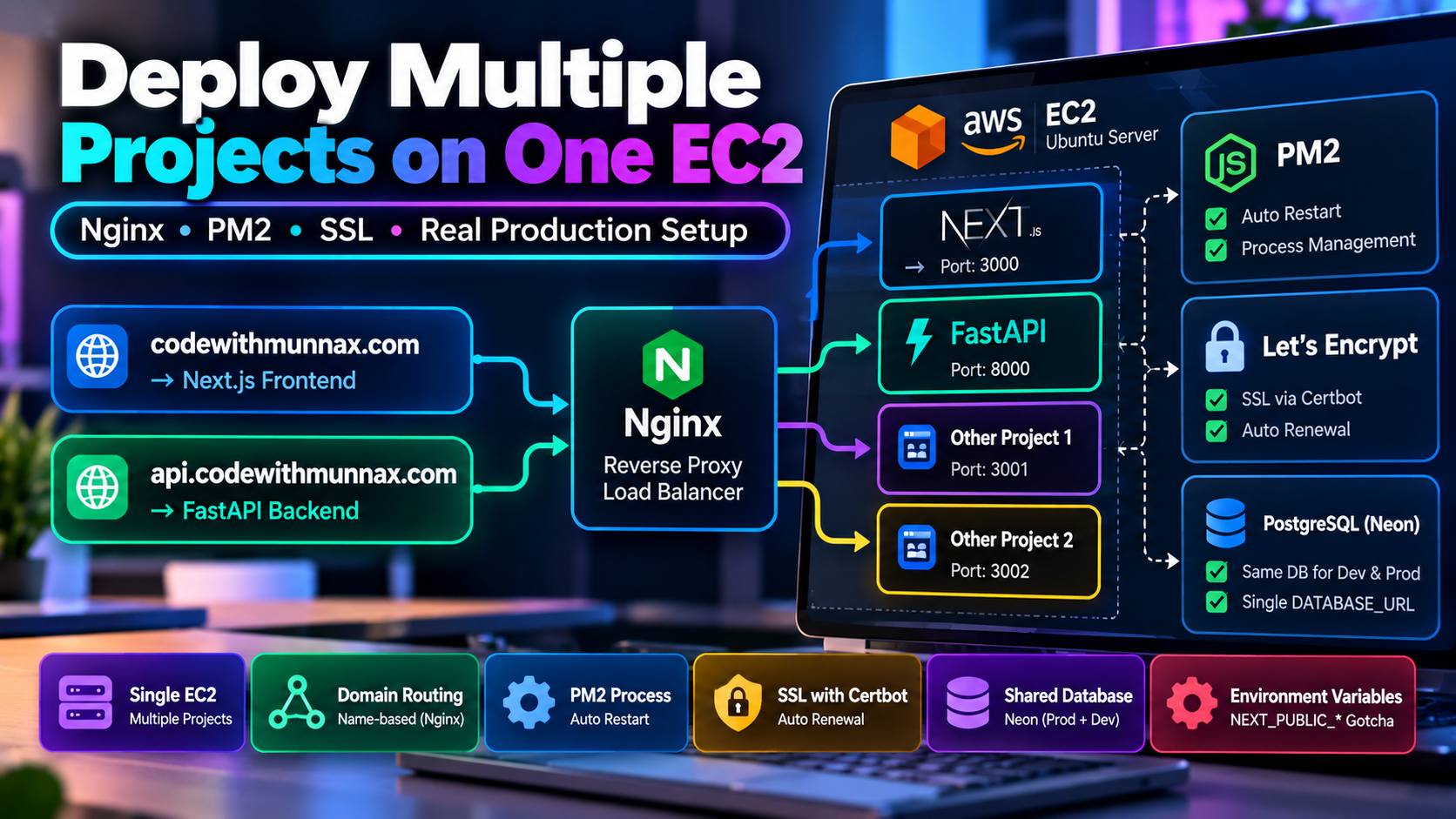
Most deployment guides assume one app, one server, one straightforward path. The real setup behind this site is closer to what a lot of small/solo projects actually look like in production: a single shared AWS EC2 instance, running this project alongside several unrelated ones, with Nginx doing the traffic routing between all of them.
Rather than a dedicated server per project — which is real money for a personal site — everything lives on one Ubuntu EC2 instance, and Nginx routes incoming requests based on the domain name, not the port a browser happens to hit:
codewithmunnax.com → Nginx → the Next.js appapi.codewithmunnax.com → Nginx → the FastAPI backendTwo subdomains, two backend processes, one box, one Nginx config doing the traffic-directing work of deciding which process handles which request.
Both the Next.js app (npm run start -- -p <port>) and the FastAPI backend (uvicorn app.main:app --port <port>) run as PM2-managed processes rather than raw background processes — PM2 handles restarts on crash and on server reboot, which matters a lot more once "someone SSHing in to manually restart a hung process" isn't an acceptable amount of downtime.
Let's Encrypt certificates through Certbot handle SSL for both subdomains, with auto-renewal configured so certificates don't silently expire — a surprisingly common failure mode for small deployments where SSL was set up once and nobody's watching the expiry date months later.
Since this box runs multiple unrelated projects, each app's port has to be deliberately chosen to avoid colliding with everything else already running — a small detail, but the kind of thing that turns into a confusing debugging session (an app just... not responding, for no apparent reason) if it's not tracked carefully across projects sharing infrastructure.
There's no separate staging database — Neon (serverless Postgres) is the single DATABASE_URL for both local development and production. That's a deliberate simplicity tradeoff for a project this size, with a real consequence: any local script run against the real .env touches live data, so scripts that seed or modify data get read carefully before running, not treated as safe-by-default.
NEXT_PUBLIC_* gotcha that's caused real incidentsEnvironment variables prefixed NEXT_PUBLIC_* get baked into the JavaScript bundle at build time, not read at request time. Changing one in .env.local and just restarting the running process does nothing — the old value is already compiled into the bundle. It requires rm -rf .next && npm run build, then a restart, or the site keeps serving stale values indefinitely. This one has genuinely broken production before it became a documented gotcha.
A shared box with careful port management and Nginx routing is meaningfully cheaper and simpler to operate than dedicated infrastructure per project, and for a personal-scale deployment, the operational tradeoffs (careful port tracking, being deliberate about the NEXT_PUBLIC_* rebuild step) are worth it against the cost of managing separate infrastructure for each project.
FAQ
Cost and operational simplicity for personal-scale projects — Nginx's name-based virtual hosting routes each domain to the right backend process on the same box, avoiding the expense of dedicated infrastructure per project.